Unleashing the Terror: A Practical Guide to Mastering the Cruzzte Font
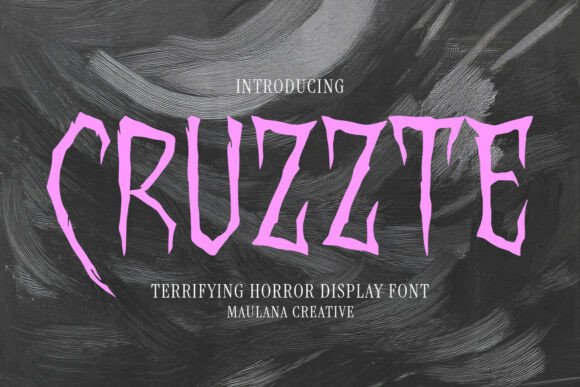
If you are a designer, event planner, or creative professional looking to evoke a visceral sense of fear and suspense, you have likely encountered the limitations of standard typography. Most standard fonts are designed for readability and neutrality, but horror projects demand the opposite: chaos, distortion, and alarm. This is where the Cruzzte Font enters the conversation. It is not merely a collection of letters; it is a carefully crafted tool designed to visually articulate the macabre. With its jagged edges, elongated forms, and dripping-blood aesthetic, Cruzzte offers a high-impact solution for anyone needing to convey a bone-rattling atmosphere. However, possessing a terrifying font is only half the battle; using it effectively requires a nuanced understanding of design principles to avoid common pitfalls that can turn a scary design into a messy one.
The Allure of the Macabre: Understanding the Cruzzte Aesthetic
The primary appeal of the Cruzzte Font lies in its unapologetic grotesqueness. Inspired by the golden age of slasher flicks, classic horror cinema, and Gothic imagery, the typeface features distorted characters that mimic elements of decay—be it sharpened claws or rotting flesh. For beginners, this level of detail is incredibly attractive because it promises instant atmosphere. You do not need to add complex textures or overlays to the letters themselves; the font does the heavy lifting.
However, a misunderstanding of what "display font" actually means leads to the first major error. Display fonts, particularly those with such aggressive stylistic features as Cruzzte, are designed for large headers and titles, not for body text. A common mistake is attempting to use this typeface for paragraphs of information, such as movie synopses or game instructions. This renders the text completely illegible. The jagged edges and irregular spacing that make the font look scary at 72pt make it unreadable at 12pt. To avoid this, you must treat Cruzzte as a focal point, not a workhorse. It is the scream, not the whisper.
Avoiding Visual Noise: The Importance of Context and Contrast
One of the most overlooked details when working with a heavy horror font like Cruzzte Font is the background. Because the typeface features intricate details—drips, jagged points, and irregular strokes—it requires "breathing room" to be effective. A frequent error is placing Cruzzte over a cluttered background, such as a detailed image of a forest or a complex pattern. The result is visual noise where the text and the background fight for attention, causing the design to lose its impact.
The Better Approach: Always prioritize legibility through contrast. If your background is busy, consider using a semi-transparent overlay or a drop shadow (though use shadows sparingly to avoid a dated look) to separate the text. Alternatively, the most effective use of Cruzzte is often against a clean, dark, or misty background where the silhouette of the letters can stand out. Remember, the goal of a horror poster or a haunted house flyer is communication first. If the viewer cannot instantly read the word "ENTER," the design has failed, regardless of how scary the font looks.
Practical Application: Horror Movie Posters and Video Game Titles
When applying the Cruzzte Font to specific mediums like movie posters or video game titles, scale is your best friend. Do not be afraid to blow the typography up to massive sizes. Let the "sharpened claw" details of the letters bleed off the edge of the canvas. This technique, known as cropping, adds dynamism and makes the design feel larger than life.
Furthermore, consider the color palette. While red is the obvious choice to complement the "dripping blood" aesthetic, it can become cliché if overused. Experiment with sickly greens, bruised purples, or stark, bone-white text against black. These color choices can evoke different sub-genres of horror—supernatural, psychological, or gritty realism—without altering the font itself.
Technical Pitfalls: Spacing, Rendering, and File Formats
From a technical standpoint, distorted fonts often come with specific challenges regarding kerning (the space between letters). The irregular shapes of the Cruzzte Font can sometimes cause letters to overlap awkwardly or appear too far apart. Beginners often accept the default spacing, leading to words that look disjointed.
The Correction: Always manually adjust the tracking and kerning when setting headlines. You want the letters to feel connected, creating a unified block of terror. Additionally, if you are using this for web headers or video thumbnails, ensure you are rendering the text correctly. Rasterizing the text layer in Photoshop or converting it to outlines in Illustrator can help preserve the jagged edges when exporting to formats like PNG or JPEG, preventing anti-aliasing from blurring the sharp details that make the font effective.
Smart Pairing: Don't Let the Chaos Overwhelm
A critical aspect of professional typography is font pairing. Because Cruzzte Font is so stylistically dominant, pairing it with another decorative font is almost always a mistake. Two "screaming" fonts create a visual conflict that confuses the viewer.
Best Practice: Pair Cruzzte with a clean, neutral sans-serif font. Fonts like Roboto, Helvetica, or Open Sans work perfectly as a counterbalance. Use Cruzzte for the main headline—the title of the movie, the name of the event, or the warning sign. Use the clean sans-serif for the date, time, location, and credits. This hierarchy ensures that the scary elements grab attention, while the supporting information remains accessible and easy to read.
Final Checks Before You Download
Before you commit to using the Cruzzte Font, verify the licensing requirements. Many high-quality display fonts have specific restrictions regarding commercial use, such as for merchandise (t-shirts, mugs) versus digital use (websites, videos). Ensure the license covers your specific project type to avoid legal issues later.
Ultimately, the Cruzzte typeface is a powerful asset for any designer looking to tap into the horror genre. By respecting its intensity, ensuring high contrast, manually adjusting spacing, and pairing it with the right secondary fonts, you can transform a simple project into an unforgettable, chilling experience. Use it wisely, and your audience won't just see your design—they will feel the dread.