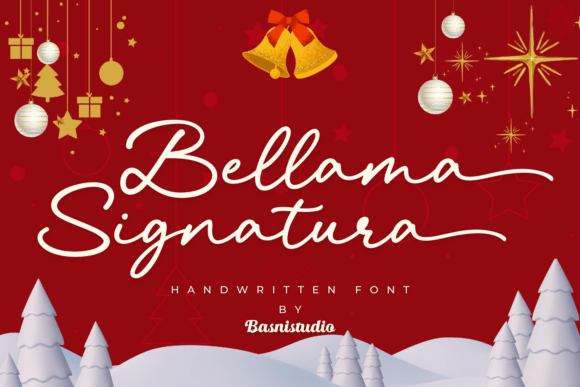
Bellama Signatura Font: Unlocking Elegance for Your Holiday Designs
The holiday season brings a unique pressure for creators, entrepreneurs, and designers to produce visuals that feel intimate, luxurious, and personal. In a market saturated with standard sans-serifs and overused generic scripts, finding a typeface that genuinely conveys "premium" can be a challenge. This is where the Bellama Signatura Font enters the conversation. It is not merely a script; it is a high-contrast signature typeface designed to infuse your work with a fluid, glamorous aesthetic. With its exaggerated end swashes and smooth downstrokes, it offers a bespoke craftsmanship feel that is perfect for Christmas cards, boutique branding, and high-end stationery.
However, possessing a beautiful font does not automatically guarantee a beautiful design. Many professionals and hobbyists alike make critical errors when integrating such a distinct typeface into their projects. To truly leverage the romantic flair of Bellama Signatura, one must understand its technical capabilities, its intended use cases, and the common pitfalls associated with ornamental scripts.
The Allure of the High-Contrast Script
Before diving into the technicalities, it is worth understanding why Bellama Signatura Font resonates so strongly with the current design trends. The font features elegant, thin upstrokes paired with bold downstrokes. This high-contrast ratio mimics the pressure variations of a dip pen or a high-quality brush, creating a rhythm that guides the viewer's eye. Unlike rigid block letters, this fluidity introduces movement. For a freelancer designing a wedding invite or a small business owner creating a gift certificate, this movement translates to emotion—specifically, the warmth and joy associated with festive celebrations.
Furthermore, the font is PUA-encoded (Private Use Areas). For the uninitiated, this is a crucial technical feature. It ensures that every glyph, swash, and alternate character is accessible, regardless of the design software you are using. Whether you are in Adobe Illustrator, Photoshop, or a basic text editor, the full character set is available to you. This accessibility is designed to empower customization, but it also presents the first major hurdle for many users: knowing how to actually use these features.
Overlooking the PUA-Encoding Advantage
One of the most common misunderstandings regarding the Bellama Signatura Font is the failure to utilize its alternate characters. Because the font is PUA-encoded, it contains a treasure trove of stylistic variations. Beginners often install the font, type their text, and leave it as is. While the standard letterforms are elegant, the magic lies in the swashes and ligatures that allow you to customize the start and end of your words.
The Mistake: Assuming the default typing result is the final product.
The Consequence: Your design may look "stock" or generic. If you are selling high-end Christmas cards, a standard layout might fail to justify a premium price point. The result is a lack of distinction, making your work look amateur compared to competitors who utilize the full glyph set.
The Solution: Access the Glyphs panel. In Adobe Illustrator or Photoshop, navigate to Type > Panels > Glyphs Panel. This allows you to see every available alternate for the letter you have selected. For example, you might select the letter "g" and swap it for a version with a longer, more dramatic tail. Better yet, use a font management tool or character map if you are working outside of Adobe software. This small step transforms a standard sentence into a piece of custom lettering.
Context Mismatch: The "Holiday Only" Trap
While the description highlights Bellama Signatura as a seasonal favorite, limiting its application strictly to Christmas cards is a missed opportunity. The "romantic flair" and "bespoke craftsmanship" make it suitable for a variety of high-end applications year-round, provided the context is right.
The Mistake: Using a heavy, high-contrast signature script for body text or corporate data.
The Consequence: Reduced readability and a mismatch in tone. If you use Bellama Signatura Font for the terms and conditions on a gift certificate or for long paragraphs of blog text, you will create visual fatigue. The eye struggles to read complex scripts in long blocks. Furthermore, using it for a corporate tech startup might send the wrong message about the brand's identity.
The Better Approach: Use it strategically as a display font. It shines in headers, logos, and short, impactful quotes. For a boutique branding project, use it for the logo and perhaps the main headline of a poster, but pair it with a clean, legible sans-serif or serif font for the details. This creates a hierarchy that looks professional and ensures the "elegance" of the script is highlighted, not cluttered.
Technical Oversights: Kerning and Spacing
Signature fonts are notorious for their spacing needs. Because the swashes in Bellama Signatura Font extend gracefully, they can sometimes collide with adjacent letters if not handled correctly.
The Mistake: Ignoring letter spacing (tracking) and kerning.
The Consequence: The text becomes illegible. If two large swashes overlap, it creates a blob of ink rather than a readable word. This is particularly problematic in formal party invitations where clarity of the guest of honor's name is paramount.
The Correction: Always adjust the tracking after typing. If the default spacing feels tight, increase the tracking slightly to give the swashes room to breathe. Additionally, manually kern specific pairs of letters. For instance, if you type "Ty," the top of the "T" and the tail of the "y" might need manual adjustment to ensure they don't crash. In vector software like Illustrator, use the shortcut Alt + Left/Right Arrow to nudge letters apart easily.
Color and Background Considerations
Given that this font is tuned for holiday designs, it is often placed on dark, rich backgrounds—deep greens, reds, or blacks—to mimic the festive atmosphere.
The Mistake: Using thin strokes on low-contrast backgrounds.
The Consequence: The upstrokes of Bellama Signatura Font are intentionally thin. If you place white text on a light grey background, or gold text on a busy, patterned background, those thin strokes will vanish. The text will appear broken or "spidery," destroying the premium quality you intended to convey.
The Solution: Ensure high contrast. If you are using a dark background, use a light font color (white, cream, or metallic gold). However, if your background is busy (like a photo of a Christmas tree), place the text on a solid shape or a semi-transparent overlay to ensure the fluid strokes remain crisp. Test your design at 100% zoom to ensure the thin upstrokes are visible to the human eye.
Practical Checklist Before You Finalize
Before you export your final design or send it to the printer, run through this quick evaluation to ensure you are getting the most out of the typeface:
- Accessibility Check: Have you utilized the Glyphs panel to swap out standard letters for more decorative alternates? Don't settle for the default "a" if a fancier version exists.
- Readability Test: Can a stranger read the header instantly? If they have to squint to decipher the signature, you have likely over-complicated the swashes.
- Pairing Logic: Did you pair Bellama Signatura Font with a complementary, neutral font? A script this expressive needs a quiet partner, not another loud typeface.
- Color Contrast: Do the thin upstrokes disappear when you step back from the screen? If so, increase the font weight (if available) or darken the background.
- PUA Encoding: Are you sure your software supports OpenType features? If you are using a basic text editor, ensure you are using the Character Map to access the special glyphs.
By treating Bellama Signatura Font as a specialized tool rather than a catch-all solution, you can elevate your holiday designs from homemade to high-end. It requires a bit of technical diligence—adjusting kerning, utilizing alternate glyphs, and ensuring contrast—but the result is a distinguished, handwritten aesthetic that perfectly captures the spirit of premium craftsmanship. Whether you are a freelancer delivering a final asset or a small business owner printing your own tags, these details make all the difference in professional presentation.